
SEO Strategy for Enterprise SaaS: Search Intent, Technical Foundations, and Conversion
For business-to-business (B2B) and enterprise SaaS companies, organic search is more than a channel for generating website traffic. It can help potential customers discover a product, evaluate technical capabilities, compare solutions, and build confidence before contacting a sales team.
However, traffic alone does not demonstrate commercial value. A page can attract thousands of visitors without reaching the people who influence purchasing decisions. Conversely, a focused page serving a specific operational need may attract fewer visitors while generating more relevant business conversations.
An effective SaaS SEO strategy connects technical website architecture, search intent, useful content, and measurable business outcomes. It accounts for the different ways executives, technical evaluators, operations teams, and procurement stakeholders research software.
This guide presents a practical framework for building that strategy, from information architecture and technical indexing to structured data, internal linking, and conversion measurement.
1. Build Information Architecture Around Search Intent
A SaaS website should help visitors understand the product, evaluate whether it fits their requirements, and identify an appropriate next step. Organizing content around these needs creates a useful foundation for both search discovery and the customer journey.
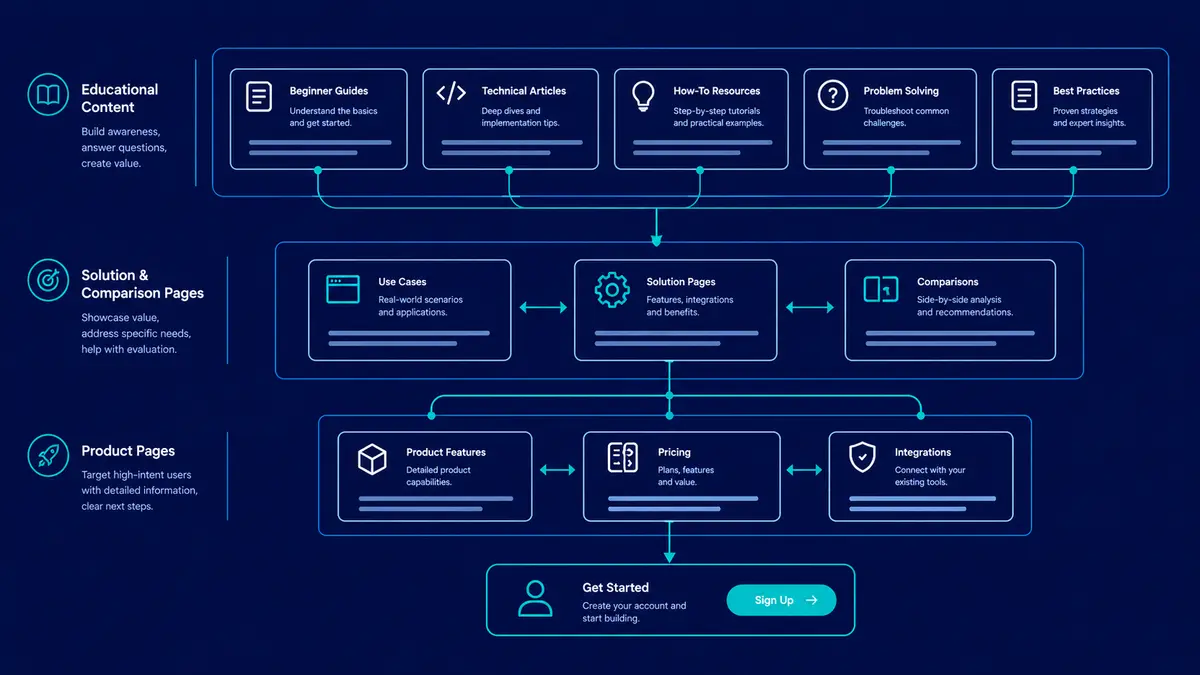
A four-layer model can help teams plan their content:
Educational content: Guides, technical articles, and explanations that address early questions.
Solutions and use cases: Pages explaining how a product addresses specific workflows, industries, or business problems.
Product evaluation: Feature pages, technical documentation, integration details, and objective comparisons.
Conversion paths: Pricing information, trial registration, contact forms, product demonstrations, or other appropriate next steps.
These layers are a planning framework, not a rigid sequence. B2B buyers frequently enter a website through whichever page best matches their immediate question.
Product and feature pages
Product pages should explain what the software does, who it serves, how it fits into existing workflows, and what distinguishes its capabilities.
Potential search targets include specific software categories, integrations, technical capabilities, and product features.
For example, a product offering API management capabilities might need separate pages explaining API authentication, access controls, supported integrations, and deployment requirements, provided each page offers meaningful information rather than repeating the same claims.
Effective product pages should include:
Clear descriptions of the product's capabilities and limitations.
Relevant screenshots or diagrams showing actual functionality.
Integration and compatibility information.
Security, deployment, or architectural details where relevant.
A logical next step for visitors who want to evaluate the product.
Claims about performance, security certifications, or customer outcomes should be supported by verifiable evidence.
Solution and use-case pages
Prospective customers often search for a business problem rather than a product category.
A solution page should explain the problem, identify the relevant constraints, and show how the product supports the intended workflow. Industry-specific pages can be valuable when industries genuinely have different requirements, regulations, integrations, or operational processes.
Avoid generating dozens of nearly identical pages by swapping industry names or job titles. Each page should provide distinct value for its intended audience.
Comparison and alternative pages
Visitors evaluating software may search for competing products, alternative solutions, or comparisons between technical approaches.
These pages should be objective and specific. Compare relevant capabilities, integrations, deployment models, pricing structures where publicly available, limitations, and intended use cases.
A credible comparison acknowledges trade-offs. Unsupported claims that one product is universally superior can undermine trust and make the page less useful to technical evaluators.
Educational and technical resources
Technical articles help prospective buyers understand problems before they are ready to evaluate a specific product.
Topics may include software architecture, security, API design, performance optimization, cloud infrastructure, and technical SEO.
Educational content should be written to answer a real question comprehensively. When a related product or service is genuinely relevant, provide a contextual link that allows interested readers to explore it without interrupting the article's primary purpose.
The objective is not to force every reader into a sales funnel. It is to make the next useful step easy to find.
2. Establish Technical SEO Foundations
A strong content strategy depends on a website that search engines can access, render, understand, and index correctly.
Modern SaaS websites often use frameworks such as Next.js, Nuxt, or Remix. These frameworks support several rendering strategies, and the right choice depends on how frequently content changes, whether a route requires authentication, and what visitors need to see on the initial request.
JavaScript rendering and content delivery
Google Search can render JavaScript using an evergreen Chromium-based rendering service. However, crawling, rendering, and indexing are distinct stages, and rendering may occur after the initial fetch.
Client-side rendering is not automatically an SEO failure. Problems arise when important content or links depend on scripts that fail, required assets are blocked, or the rendered page does not expose the content search engines need.
For public-facing marketing and editorial pages, server-side rendering, static generation, or prerendering can make important content and metadata available in the initial HTML response. These approaches can also improve compatibility with crawlers and social preview bots that do not execute JavaScript reliably.
Choose a rendering strategy based on the route's requirements:
Static generation: Appropriate for content that can be generated ahead of time and updated through a controlled publishing process.
Server-side rendering: Useful when a page needs request-time data while still delivering complete HTML.
Incremental regeneration or revalidation: Useful when generated content needs periodic or event-driven updates.
Client-side rendering: Appropriate for interactive experiences when the content-delivery and indexing requirements are handled correctly.
Regardless of the framework, verify the actual production response. Inspect the page's initial HTML, rendered output, title, meta description, canonical URL, robots directives, and internal links.
Google's JavaScript SEO guidance explains the rendering process and its implications for discoverability: https://developers.google.com/search/docs/crawling-indexing/javascript/javascript-seo-basics
Canonical URL consistency
A canonical URL identifies the preferred version of a page when similar or duplicate URLs exist.
For example, tracking parameters may create several URLs that display the same article. The page should normally declare the clean, preferred URL as its canonical.
A canonical tag uses the following HTML syntax:
<link
  rel="canonical"
  href="https://www.example.com/blog/saas-security"
/>
This is an illustrative example. Replace the domain and path with the actual preferred URL.
Maintain consistency across:
HTTP versus HTTPS.
Preferred hostname, such as
wwwor non-www.Trailing-slash conventions.
Internal links and sitemap entries.
Redirect destinations and canonical declarations.
Pagination and filtered URLs where applicable.
Canonical tags are signals, not absolute commands. Search engines may select a different canonical when other signals conflict, so the surrounding URL architecture should be consistent.
XML sitemaps and indexing hygiene
An XML sitemap helps search engines discover URLs, but it does not guarantee indexing or higher rankings.
A well-maintained sitemap should generally contain the canonical URLs that the site owner wants search engines to discover. Avoid including redirected URLs, pages marked noindex, and URLs that return errors.
Use the lastmod attribute only when the page has genuinely changed in a way that matters, rather than updating every timestamp during every deployment.
For larger websites, separate sitemaps for articles, products, and other content types can make indexing diagnostics easier to interpret in Google Search Console. This is optional, not a requirement for every website.
Crawl-budget optimization should also be proportional to the site's scale. Most small and medium-sized websites should prioritize accessible pages, useful content, consistent internal links, correct status codes, and elimination of low-value URL duplication before investing in specialized crawl-budget strategies.
3. Use Structured Data Accurately
Structured data provides machine-readable information about a page and the entities it describes. JSON-LD is a common format for adding this information to HTML.
For SaaS websites, relevant Schema.org vocabulary may include:
Organization: Describes the organization associated with the website.WebSite: Describes the website.ArticleorBlogPosting: Describes editorial content, including relevant headline, author, and publication information.SoftwareApplication: Describes a software application when the page and available facts support that classification.BreadcrumbList: Describes a page's position within a navigational hierarchy.
Select schema types according to the actual page content. Adding every possible schema type to every page does not improve its relevance.
Keep markup consistent with visible content
Structured data should accurately represent the content available to visitors. Do not invent authors, ratings, product capabilities, prices, reviews, or organizational details.
For example, a software product page should not claim a certification that the product does not hold. A rating should not be fabricated to make a product listing appear more credible.
Google also has specific eligibility requirements for certain rich-result features. Schema.org validity alone does not establish eligibility for a Google search enhancement.
For SoftwareApplication markup, review Google's current requirements carefully. Its documented rich-result requirements include specific offer and rating or review properties. If a SaaS product uses quote-based pricing and lacks the required evidence for eligibility, do not invent a price or rating simply to complete the markup. Use only properties that are truthful and supported, and recognize that valid general structured data may still be useful even when a particular rich result is unavailable.
FAQ markup requires similar care. Although FAQPage is valid structured-data vocabulary, commercial SaaS sites should not assume it will generate expandable FAQ results in Google Search. Google restricts FAQ rich results primarily to well-known, authoritative government and health websites.
Validate before deployment
A practical structured-data workflow includes:
Confirm that the markup describes information visible on the page.
Validate syntax and properties against the relevant vocabulary.
Test eligibility with Google's Rich Results Test when the markup targets a supported rich-result type.
Inspect the live URL in Google Search Console.
Monitor reported errors and changes after deployment.
Structured data can help search engines interpret content, but it does not guarantee enhanced search appearance or improved rankings.
Google's reference documentation is available at https://developers.google.com/search/docs/appearance/structured-data/sd-policies and https://developers.google.com/search/docs/appearance/structured-data/software-app.
4. Build Contextual Internal Links and Topic Clusters
A content library becomes more useful when related pages connect naturally. Without internal links, valuable articles may remain difficult for visitors to discover, while product pages may fail to connect with educational resources that explain relevant technical concepts.
Topic clusters provide one way to organize this relationship.
A cluster might contain:
A central overview page covering a broad subject.
Supporting articles addressing specific questions or subtopics.
Relevant product, service, or use-case pages.
Contextual links connecting these resources where they help the reader.
For example, a SaaS security cluster could connect an overview of application security with deeper articles about tenant isolation, authorization, API security, and secure deployment practices.
A central page does not need to link to every article mechanically, nor must every article link back to it in an identical pattern. Link placement should reflect the actual relationship between the content.
Write descriptive anchor text
Anchor text should tell readers what they can expect from the destination page.
Instead of repeatedly using generic text such as "click here," use a natural description of the destination, such as "our guide to API design principles," when it accurately describes the linked resource.
Internal links serve several purposes:
Helping visitors discover relevant information.
Helping crawlers find additional pages.
Clarifying relationships between topics and products.
Giving readers a logical path toward more detailed technical or commercial information.
Avoid adding links solely to meet a numerical target. A small number of relevant links can be more useful than a large collection of unrelated references.
Connect educational content to business goals
Educational articles should remain genuinely helpful, but they can also provide a natural bridge to relevant products and services.
For example, an article about API design might link to an appropriate development service page or a related guide about application security. The link should appear where the next step makes sense, not where it merely creates a promotional opportunity.
For a growing SaaS business, this approach can make the website easier to navigate while helping prospective customers move from understanding a problem to evaluating possible solutions.
5. Measure SEO From Discovery to Conversion
SEO performance should be measured across multiple stages. Rankings and traffic provide useful diagnostic information, but neither directly establishes that organic search is producing qualified business opportunities.
A practical reporting framework separates technical health, search visibility, visitor behavior, and commercial outcomes.
StageUseful metricsPrimary toolsCrawling and indexingIndexed URLs, excluded URLs, crawl errors, canonical issuesGoogle Search Console, URL InspectionSearch visibilityImpressions, clicks, click-through rate, average positionGoogle Search ConsoleVisitor behaviorLanding pages, engaged sessions, relevant interactionsGA4, PostHog, or another analytics platformConversionForm submissions, trial registrations, demo requestsWebsite analytics and conversion trackingCommercial impactQualified leads, sales opportunities, pipeline contributionCRM and sales reporting
Choose tools according to the organization's needs and privacy requirements. The goal is a coherent measurement system, not a large collection of disconnected dashboards.
Interpret search visibility carefully
Google Search Console reports impressions, clicks, click-through rate, and average position for search performance.
Average position is an aggregate metric, not a permanent rank for a keyword. Results can vary by query, location, device, and time, so avoid interpreting small changes as definitive evidence of success or failure.
Use query and page reports together. Query data can reveal the topics associated with search visibility, while page-level data can help identify which content attracts impressions and clicks.
Connect landing pages to conversions
Analytics and CRM data can help determine whether organic visitors take meaningful actions.
For example, a SaaS company might track which landing pages were visited before a demo request, trial registration, or qualified sales conversation. This provides a better understanding of how content contributes to acquisition than measuring pageviews alone.
However, organic search queries cannot generally be matched directly to individual CRM leads. Google Search Console provides aggregated search data, and the query associated with an individual organic click is not ordinarily passed to the site's analytics platform as a complete, identifiable keyword record.
Instead, analyze organic performance at the landing-page, content-cluster, and conversion-event levels. Use CRM records and suitable analytics integrations to understand which pages introduced or influenced opportunities.
Attribution has limitations. Consent choices, browser restrictions, long sales cycles, multiple stakeholders, and interactions across several channels can make it difficult to establish exactly how much credit belongs to one article or visit. Treat attribution as useful evidence for decision-making, not as absolute proof of causation.
Avoid common SaaS SEO mistakes
Keyword cannibalization
Several pages may compete for similar search intent without offering distinct value. Review overlapping pages and determine whether their purposes should be differentiated, consolidated, or linked more clearly.
Misaligned search intent
A technical explainer may not satisfy someone searching for pricing or a product comparison. Match the content format to the question the visitor is trying to answer.
Low-value indexable URLs
Internal search pages, unnecessary filter combinations, duplicate paths, and staging environments can create indexing problems. Decide deliberately which URL types should be discoverable and indexable.
Content without a distribution or conversion path
Publishing an article does not ensure that it will attract relevant visitors. Support useful content through internal links, appropriate distribution, accurate metadata, and relevant next steps.
Reporting traffic without commercial context
An increase in impressions or clicks is useful evidence of visibility, but it should be evaluated alongside the relevance of the audience, engagement with the content, and the outcomes the business actually values.
Conclusion
An effective enterprise SaaS SEO strategy brings together search intent, technical accessibility, useful content, structured data, internal linking, and measurement that reflects business goals.
Technical correctness helps search engines discover and interpret pages. Strong content gives prospective customers a reason to visit and return. Clear information architecture helps them explore related topics, evaluate solutions, and take an appropriate next step.
The strongest approach is evidence-driven: establish a baseline, prioritize meaningful opportunities, validate changes, and evaluate performance over time. Rankings and traffic matter, but their value depends on whether the right audience discovers content that genuinely helps them.
At Aformix, we build our own software products and also take on client work: custom web development, WordPress development, SEO, and software and SaaS engineering. Our approach connects technical foundations with useful content and clear user journeys, supporting sustainable search visibility without treating rankings or traffic as guarantees of business growth.