
Cross-Platform Mobile Development with React Native: Architecture, Navigation, and Native Trade-offs
For engineering teams evaluating mobile development strategies, cross-platform frameworks offer an appealing proposition: share business logic, maintain a common product direction, and reduce duplicated engineering effort across iOS and Android.
React Native has become an established option for building production mobile applications using React and JavaScript or TypeScript. However, a persistent misconception is that cross-platform development eliminates the need to understand native mobile platforms.
Production applications still need to account for operating system permissions, application lifecycle events, background execution limits, secure storage, navigation conventions, and platform-specific behavior. Sharing application code does not remove these responsibilities.
This guide explores the architectural realities of React Native. It examines when the framework is appropriate, how to organize shared and platform-specific code, how to design offline-capable applications, how navigation and deep linking work, and how the New Architecture affects native integration.
1. When Is React Native the Right Choice?
Choosing a mobile framework begins with the product's requirements, not the popularity of a technology.
React Native is particularly effective when the application relies on business workflows, data presentation, API communication, forms, and interactive interfaces rather than highly specialized native processing.
Where React Native fits well
Business and workflow applications
Examples include SaaS companion applications, CRM clients, e-commerce applications, household coordination tools, internal business systems, and collaboration software. These products often emphasize data access, forms, notifications, and user workflows.
Teams with React and TypeScript experience
Teams familiar with React can reuse relevant engineering practices, domain models, validation rules, API clients, and design tokens. Some packages can be shared with a web application, although browser and native UI components usually have different implementation requirements.
Products that need consistent cross-platform behavior
When business rules and feature releases should remain aligned across iOS and Android, sharing application logic can reduce duplication and simplify maintenance.
Products that need access to native capabilities
React Native supports native integrations through modules and libraries. Applications can use device features while keeping most product logic in TypeScript.
When native development may be preferable
Pure native development with Swift or Kotlin can be the stronger choice when the product depends heavily on:
Specialized camera pipelines, computational photography, or demanding real-time media processing.
Complex AR or VR experiences and advanced graphics rendering.
Low-latency hardware communication with strict timing requirements.
Extensive operating-system-specific background services.
Deep platform integrations that are difficult to maintain reliably through available React Native libraries.
These are not automatic reasons to reject React Native. Many demanding features can be implemented through native modules or dedicated native components. The decision depends on performance requirements, library maturity, platform behavior, and the team's ability to maintain native code.
Evaluate the whole engineering cost
A useful comparison includes more than initial development speed.
ConsiderationReact NativePure nativeBusiness logicCan be shared across platformsOften duplicated or separately packagedUI implementationShared where platform behavior permitsUses each platform's native UI stackNative integrationMay require modules or platform-specific codeDirect access to platform APIsTeam requirementsJavaScript or TypeScript plus native knowledgeiOS and Android expertiseTestingShared logic and platform-specific testingPlatform-specific testingPerformanceDepends on workload, architecture, and native integrationDirect control over platform implementation
React Native is a trade-off, not a universal shortcut. The right architecture is the one that satisfies the product's requirements without creating unnecessary long-term maintenance costs.
2. Shared Code Architecture and Platform Boundaries
A well-designed React Native application separates business rules from presentation and platform-specific behavior.
The proportion of reusable code varies considerably by product. A data-heavy application with shared domain logic may reuse much of its non-UI code, while a product with substantially different platform interactions may require more separate implementations. A fixed code-sharing percentage should not be treated as a reliable planning target.
A practical architecture
Application Features
        |
        v
Domain and Business Logic
        |
        v
Data Access and API Layer
        |
        v
Platform Capability Interfaces
        |
        +--------------------+
        |                    |
        v                    v
     iOS Layer           Android Layer
     Keychain            Keystore-backed APIs
     APNs                 FCM
     iOS UI details       Android UI details
     Native modules       Native modules
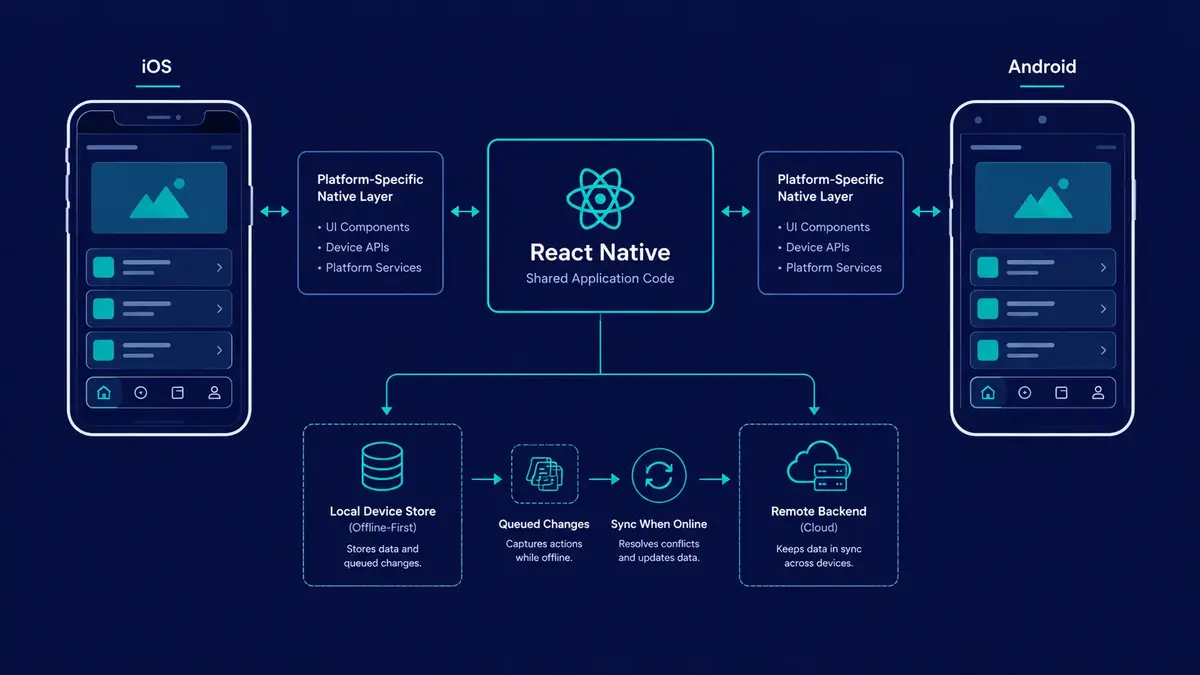
The shared layer can contain domain models, validation, API clients, state management, synchronization rules, and reusable business logic.
The platform layer handles capabilities that differ between operating systems, including secure storage, permissions, notification registration, and specialized native integrations.
Organize platform-specific implementations
React Native supports platform-specific file extensions, including .ios.tsx and .android.tsx.
For example:
src/
  services/
    secureStorage.ts
    secureStorage.ios.ts
    secureStorage.android.ts
  features/
    projects/
      ProjectList.tsx
      ProjectDetails.tsx
  domain/
    project.ts
    validation.ts
The shared interface can define the contract:
export interface SecureStorage {
  getItem(key: string): Promise<string | null>;
  setItem(key: string, value: string): Promise<void>;
  removeItem(key: string): Promise<void>;
}
The iOS and Android implementations can use appropriate native-backed secure storage libraries behind this interface. The exact implementation depends on the library and platform capabilities.
Important: A shared interface does not make the underlying security guarantees identical. Keychain accessibility settings, Android Keystore behavior, device support, and library implementation details must be evaluated separately.
For minor platform differences, React Native also provides Platform.select and the Platform API.
import { Platform, StyleSheet } from "react-native";

const styles = StyleSheet.create({
  headerContainer: {
    paddingTop: Platform.select({
      ios: 12,
      android: 8,
      default: 8,
    }),
    ...Platform.select({
      ios: {
        shadowColor: "#000",
        shadowOpacity: 0.12,
        shadowRadius: 4,
        shadowOffset: { width: 0, height: 2 },
      },
      android: {
        elevation: 3,
      },
    }),
  },
});
The values here are illustrative. Real spacing should account for safe areas, system bars, and the screen layout rather than assuming a single hard-coded offset will work across all devices.
Use separate files when the behavior or implementation genuinely differs. Use Platform.select for small, localized adjustments. Both approaches are valid, and neither should become a substitute for a clear architecture.
3. Navigation and Deep Linking
Mobile navigation manages more than changing the visible component. It must account for navigation history, gesture transitions, hardware back behavior, application lifecycle changes, and links that open specific screens.
Two widely used options in the React Native ecosystem are React Navigation and Expo Router.
React Navigation
React Navigation provides navigators and APIs for stack navigation, tabs, drawers, and other common mobile navigation patterns.
It is useful when an application needs explicit control over navigation structure, screen behavior, and nested navigation flows.
Expo Router
Expo Router builds on React Navigation and uses a file-based routing convention. For example:
app/
  _layout.tsx
  (tabs)/
    _layout.tsx
    index.tsx
    settings.tsx
  projects/
    [id].tsx
A route such as projects/[id].tsx can represent a project detail screen whose identifier comes from the route parameters.
Expo Router is particularly useful when file-based organization and deep linking fit the application's navigation model. Both Expo Router and React Navigation can support production applications. The choice should reflect the team's requirements and existing architecture.
Design deep links deliberately
A mobile application may use an illustrative URL such as:
https://app.example.com/projects/proj_123This link could open a project detail screen in the installed application through correctly configured Universal Links on iOS and Android App Links on Android.
Custom URL schemes, such as myapp://projects/proj_123, are another option, but they do not provide the same domain-ownership verification as Universal Links or App Links.
Deep links are useful for:
Opening a particular record from a notification.
Inviting a user directly to a shared resource.
Returning users to a relevant screen after authentication.
Connecting web content with the corresponding mobile experience.
A production implementation must validate route parameters and enforce authorization. A link containing a project identifier must never grant access to that project by itself.
Also account for the application's launch state. A link may arrive when the application is already running, when it is in the background, or when it needs to start from a cold launch. Authentication and navigation initialization should handle these cases without losing the intended destination.
4. Offline Resilience and Data Synchronization
Mobile connectivity is unpredictable. Applications can encounter intermittent networks, slow responses, airplane mode, and temporary server outages.
For applications that promise offline functionality, a network failure should not automatically destroy the user's work. However, offline support requires a deliberate data model and synchronization strategy, not merely local storage.
Choose storage according to the data
Different storage mechanisms solve different problems.
Key-value storage
Libraries such as AsyncStorage or MMKV can store preferences, small caches, and other key-value data. Their capabilities and access patterns differ.
Do not treat ordinary key-value storage as a secure vault for authentication tokens or other secrets. Sensitive values should use an appropriate secure-storage solution backed by platform security facilities.
SQLite and local databases
SQLite-backed storage is useful for structured records, queries, relationships, and applications that need to work with substantial amounts of data offline.
Libraries such as WatermelonDB provide higher-level data modeling and synchronization-oriented capabilities. Whether a particular library performs well depends on query design, indexing, data volume, and the work executed on the JavaScript thread.
Secure storage
Authentication credentials and other sensitive values need separate treatment from ordinary application data. Secure storage is not a replacement for a relational database, and a database is not automatically a secure credential store.
Design an explicit synchronization loop
A typical offline mutation flow looks like this:
User edits a record
        |
        v
Validate and persist the change locally
        |
        v
Update the UI from local state
        |
        v
Queue the pending operation
        |
        v
Connectivity and retry policy permit sync?
        |
        +---- No ----> Keep pending, retry later
        |
        +---- Yes ---> Send operation to the API
                            |
                            v
                    Handle server response
                            |
                 +----------+----------+
                 |                     |
                 v                     v
             Accepted              Conflict/error
                 |                     |
                 v                     v
          Mark synchronized     Retry or reconcile
This is a conceptual flow. Real implementations need to account for application restarts, expired credentials, connectivity changes, duplicate requests, and server-side validation.
Idempotency and conflict resolution
A mobile application may send the same operation more than once because a request times out after the server has already processed it.
Where appropriate, give each queued mutation a stable operation identifier and have the server support idempotent processing. This helps prevent retries from creating duplicate records or performing the same action twice.
Conflicts also need explicit rules. For example, if two devices update the same task while offline, the application must decide whether to use version checks, field-level reconciliation, a server-authoritative policy, or user-assisted resolution.
A simple last-write-wins strategy may be acceptable for some low-risk preferences, but it can silently overwrite important changes in collaborative systems.
Other important considerations include:
Persisting queued operations before showing them as safely saved.
Using bounded retries with backoff for transient failures.
Distinguishing permanent validation errors from temporary network errors.
Handling authentication expiry without discarding pending work.
Preventing unauthorized data from remaining accessible after sign-out.
Testing interrupted synchronization and application restarts.
Offline-first architecture is a product capability with real complexity. It should be prioritized according to what users genuinely need to accomplish without a connection.
5. React Native's New Architecture
React Native's New Architecture modernizes the interaction between JavaScript and native platform code. Its major building blocks include JavaScript Interface (JSI), TurboModules, and the Fabric renderer.
Understanding these components helps engineers evaluate libraries, debug performance problems, and decide when native integration is justified.
JavaScript Interface (JSI)
JSI provides an interface between the JavaScript runtime and C++ host objects. It enables more direct interactions between JavaScript and native-backed functionality than the legacy bridge's serialized message model.
However, JSI does not mean every native operation is automatically synchronous, free of serialization, or executed on the same thread. The actual behavior depends on the module implementation, execution model, and operation.
Long-running work should still be designed with thread and responsiveness considerations in mind.
TurboModules
TurboModules modernize native module integration and support lazy initialization where appropriate. This can avoid initializing certain native modules before they are needed.
The effect on startup performance depends on which modules an application uses and how they are initialized. TurboModules should not be assumed to deliver a guaranteed cold-start improvement in every application.
Fabric renderer
Fabric is React Native's modern rendering system. It improves the integration between React's rendering model and native views and supports the New Architecture's rendering capabilities.
It does not eliminate all layout or animation performance issues. Expensive JavaScript work, excessive view hierarchies, costly native operations, and poorly designed animations can still produce dropped frames.
What this means in practice
Before changing architecture or replacing a library, identify the actual bottleneck.
Ask:
Does the feature require a native capability that the current library does not expose?
Is JavaScript execution delaying interaction?
Is the issue related to layout, image processing, or native view rendering?
Is a dependency compatible with the project's React Native version and architecture?
Can the problem be solved with a supported library before introducing custom native code?
The New Architecture improves the foundation for React Native applications, but it does not remove the need for profiling, appropriate thread usage, or platform-specific testing.
6. Mobile Security and Release Engineering
A production mobile application must protect user data, manage operating system permissions, and deliver updates reliably.
Security cannot depend entirely on hiding sensitive values in the client. A mobile application runs on a device controlled by its user, so the server must remain responsible for authorization and access to protected resources.
Secure storage and key management
Use appropriate platform-backed mechanisms for sensitive data.
iOS: Keychain Services can store credentials and other sensitive items, with accessibility settings chosen according to the application's needs.
Android: Android Keystore allows cryptographic keys to be managed by the platform and can use hardware-backed protection where supported.
These facilities are not interchangeable in every detail, and the security properties depend on the implementation, device, operating system, and configuration.
Follow these principles:
Never embed long-lived private server secrets in the mobile bundle.
Avoid storing access tokens in plain text or ordinary preferences.
Use short-lived credentials and appropriate refresh-token handling.
Keep authorization checks on the server.
Use HTTPS and configure authentication flows carefully.
Minimize the sensitive data stored locally.
Clear or revoke credentials appropriately when users sign out.
Avoid logging tokens, private records, or other sensitive information.
Secure local storage helps protect data at rest. It does not make a compromised device, an exposed session, or an insecure backend safe.
Permissions and application lifecycle
Request permissions only when the feature needs them, and explain why the application needs access.
Plan for permissions being denied, revoked, or limited. Handle backgrounding and process termination without assuming the application will continue running indefinitely.
Operating systems impose limits on background execution. If the product needs reliable background processing, evaluate the platform's supported mechanisms rather than relying on a continuously running JavaScript task.
Push notifications can notify users about events, but delivery timing and background execution are not guaranteed. Critical workflows must tolerate delays and missed notifications.
Automate mobile release pipelines
Manual release procedures can be error-prone, especially when signing credentials, version numbers, build configurations, and store submissions must remain consistent.
Tools such as Fastlane and Expo's build and submission services can automate parts of the process, depending on the project's setup.
A reliable pipeline should consider:
Running type checks, linting, and automated tests.
Building release configurations for both platforms.
Managing signing credentials and secrets securely.
Testing on representative devices and operating system versions.
Producing identifiable artifacts and release metadata.
Testing authentication, notifications, deep links, and upgrade behavior.
Preparing rollback and incident-response procedures.
Over-the-air updates require guardrails
Expo Updates and similar mechanisms can deliver compatible JavaScript and asset changes to installed applications without requiring a new store release for every eligible update.
However, an over-the-air update is not a universal substitute for store distribution. Changes that require a new native binary, such as adding a native module or changing native configuration in ways that affect the binary, generally require a new build and distribution process.
Follow the applicable Apple and Google policies, use compatible runtime versions, and test updates before rollout. Use staged deployment and rollback mechanisms where available. Never assume an update has reached every device immediately.
7. A Practical React Native Architecture Checklist
Before shipping a production application, review the architecture across the following areas.
AreaQuestions to answerCode organizationAre business logic, UI, and native integrations separated appropriately?Platform differencesHave iOS and Android behavior been tested independently?NavigationDo deep links, authentication redirects, and back navigation work reliably?Offline supportAre local writes, retries, duplicate operations, and conflicts handled explicitly?Data securityAre credentials stored appropriately and access enforced by the server?PerformanceHave startup, rendering, memory use, and expensive operations been profiled?Background behaviorDoes the application handle suspension, termination, and permission changes?Release pipelineAre builds, signing, tests, and versioning reproducible?UpdatesAre native changes distinguished from eligible JavaScript and asset updates?
The depth of each requirement depends on the application. A simple informational app may not need an offline mutation queue, while a field-service or collaboration application may depend on it for core workflows.
Architecture should follow the product's actual reliability, security, and performance requirements rather than implementing every possible subsystem from the beginning.
Conclusion
React Native provides substantial engineering leverage when used with architectural discipline. It enables teams to share application logic and build cross-platform experiences without pretending that iOS and Android are identical environments.
Successful applications establish clear platform boundaries, design navigation and deep linking deliberately, and implement offline synchronization only to the level their workflows require. They protect credentials with appropriate platform-backed mechanisms, profile real bottlenecks, and automate release processes without overlooking native constraints.
The New Architecture strengthens React Native's foundation, but production quality still depends on sound data flow, lifecycle management, security practices, and platform-specific verification.
At Aformix, we build our own software products and also take on client work: custom web development, WordPress development, SEO, and software and SaaS engineering. Our approach to mobile engineering emphasizes maintainable architecture, reliable data synchronization, secure integrations, and practical release workflows.
The goal of cross-platform development is not to eliminate native engineering. It is to share the right parts of the system while respecting the differences that matter.