
Cloud-Native Architecture with Kubernetes: Workload Design, Resilience, and Operational Trade-Offs
Kubernetes has become a widely adopted platform for container orchestration. It provides a declarative way to deploy applications, schedule workloads, recover from certain failures, and manage application scaling across clusters of machines.
For organizations operating many services across complex environments, these capabilities can simplify infrastructure management. However, Kubernetes also introduces operational responsibilities that smaller engineering teams may underestimate. Cluster upgrades, networking, observability, security policies, capacity planning, and incident response all require time and expertise.
For startups and growing SaaS businesses, adopting Kubernetes before the underlying complexity justifies it can divert engineering effort away from product development. Managed container platforms and application hosting services may provide everything a team needs with considerably less operational overhead.
This guide examines Kubernetes from an architecture-first perspective. It explains how to evaluate the platform, design resilient workloads, allocate resources, approach deployment strategies, and establish security boundaries without introducing unnecessary complexity.
1. Deciding Whether Kubernetes Is the Right Choice
Kubernetes should be selected because its capabilities solve specific operational problems, not simply because an application uses containers or is expected to grow.
Before choosing an orchestration platform, evaluate the workload, deployment requirements, team capabilities, and ongoing infrastructure costs.
Questions to ask before adopting Kubernetes
Workload complexity: Do you operate multiple services, scheduled jobs, background workers, and event-driven workloads that benefit from a shared orchestration platform?
Operational ownership: Does your team have the expertise and capacity to manage cluster upgrades, networking, monitoring, security, and incidents?
Deployment requirements: Do you need advanced rollout controls, specialized scheduling, or fine-grained traffic management?
Infrastructure constraints: Must applications run across multiple cloud providers, private infrastructure, or customer-managed environments?
Economic justification: Will the benefits of centralized orchestration outweigh the additional engineering and infrastructure costs?
There is no universal number of microservices at which Kubernetes becomes necessary. A system with many simple services can run effectively on a managed platform, while a smaller system with demanding scheduling, networking, or isolation requirements may benefit from Kubernetes.
When managed container platforms make more sense
Managed container platforms reduce the amount of infrastructure a team must operate directly. Depending on the provider and service configuration, they can handle much of the underlying compute management, deployment orchestration, scaling, and infrastructure maintenance.
Examples include:
AWS ECS with Fargate: Suitable for teams that want container orchestration without managing the underlying compute servers.
Google Cloud Run: Useful for containerized applications that benefit from a managed deployment and scaling model.
Azure Container Apps: An option for containerized applications, background processing, and event-driven workloads.
Render and Fly.io: Alternative application hosting platforms for teams that prioritize straightforward deployment and manageable infrastructure.
These services do not eliminate every operational responsibility. Application security, database management, deployment configuration, observability, and cost control still matter. Their advantage is that they reduce the infrastructure surface the engineering team must manage.
When Kubernetes becomes justified
Kubernetes is worth evaluating when its orchestration capabilities address concrete requirements.
Complex workload orchestration
Applications may combine HTTP services, long-running workers, scheduled jobs, streaming consumers, and specialized compute workloads. Kubernetes offers a common scheduling and management model for these different workload types.
Infrastructure portability
Kubernetes provides a consistent API and workload model across supported environments. This can reduce some deployment differences between cloud providers and private infrastructure, although storage, networking, identity, load balancing, and managed services can still create significant portability challenges.
Advanced traffic management
Teams may need controlled traffic shifting, progressive delivery, service-to-service encryption, or detailed traffic policies. Kubernetes can support these patterns through additional components such as service meshes, ingress controllers, and compatible networking implementations.
Established platform engineering
Kubernetes becomes more attractive when an organization can invest in reusable deployment templates, internal platform tooling, standardized observability, and automated cluster operations.
The decision is not simply Kubernetes versus no Kubernetes. It is a comparison between the operational burden of each available platform and the requirements of the application.
2. Cloud-Native Workload Design: Understanding the Pod Contract
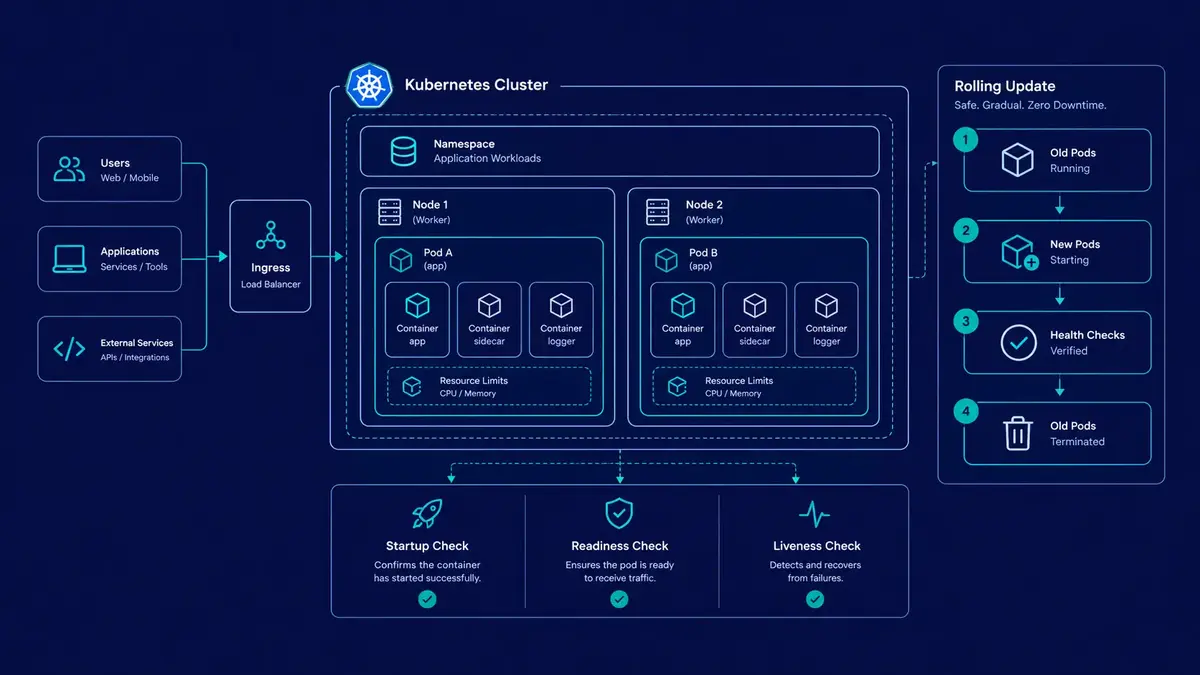
In Kubernetes, the Pod is the smallest deployable unit. A Pod contains one or more closely related containers that share a network namespace and can share storage volumes.
Most application workloads use a single primary application container per Pod. Multiple containers are appropriate when processes have a tightly coupled lifecycle, such as an application container paired with a supporting sidecar.
Cloud-native applications should generally treat individual Pods as replaceable. A Pod may be terminated, rescheduled, or recreated during deployments, failures, or infrastructure maintenance.
This has several architectural implications:
Do not rely on a Pod's local filesystem for durable application data.
Keep important application state in appropriate external services, such as databases or object storage.
Design background jobs to handle interruptions and retries safely.
Make startup, shutdown, and health reporting explicit.
Avoid relying on a specific Pod IP or a particular instance remaining available.
Persistent data is not incompatible with Kubernetes. Stateful workloads can use PersistentVolumes and StatefulSets where appropriate, but storage durability, backup, recovery, and failover still require deliberate design.
Health probes: Three different responsibilities
A running container is not necessarily a healthy application. A process can remain alive while its HTTP server is unresponsive, its initialization is incomplete, or its dependencies are unavailable.
Kubernetes provides three probe types to help manage these conditions.
The following example shows a simplified container specification excerpt:
containers:
  - name: api-service
    image: example/api-service:1.0.0
    ports:
      - containerPort: 8080

    startupProbe:
      httpGet:
        path: /api/health/startup
        port: 8080
      periodSeconds: 2
      failureThreshold: 30

    livenessProbe:
      httpGet:
        path: /api/health/liveness
        port: 8080
      periodSeconds: 10
      failureThreshold: 3

    readinessProbe:
      httpGet:
        path: /api/health/readiness
        port: 8080
      periodSeconds: 5
      failureThreshold: 2
The probe endpoints must exist in the application and should reflect the intended health contract. The thresholds above are illustrative starting points, not universal production settings.
Startup probe
A startup probe gives an application time to initialize. Until it succeeds, Kubernetes does not run its configured liveness and readiness probes for that container.
This is particularly useful for applications that need to load configuration, initialize dependencies, or perform other startup work before serving requests.
Liveness probe
A liveness probe determines whether a container should be restarted because the application appears unable to recover without restarting.
A failing liveness probe can trigger a container restart. However, an overly aggressive probe can create repeated restart loops during temporary resource pressure or dependency problems.
Readiness probe
A readiness probe determines whether a container should receive normal traffic through Kubernetes Service routing.
When readiness fails, the Pod is generally removed from the corresponding Service's ready endpoints without necessarily being restarted. This is useful during initialization and temporary conditions in which the application cannot safely serve requests.
Readiness checks should be designed carefully. If every application instance fails readiness whenever a shared database experiences a brief interruption, the entire service may become unavailable even when some requests could still be handled safely.
A practical design separates the three responsibilities and defines clear failure behavior for each one.
3. Resource Allocation and Autoscaling
Resource configuration affects scheduling, application performance, cluster stability, and infrastructure cost. Leaving CPU and memory requests undefined can make capacity planning less predictable and allow poorly behaved workloads to compete excessively for resources.
CPU and memory requests versus limits
Consider this example:
resources:
  requests:
    cpu: "250m"
    memory: "512Mi"
  limits:
    cpu: "1000m"
    memory: "1Gi"
The values describe the container's resource configuration.
Requests influence scheduling and resource accounting. Kubernetes uses them when deciding where a Pod can fit, and CPU requests are also used as the baseline for CPU utilization calculations in common autoscaling configurations.
Limits establish resource ceilings enforced by the container runtime and operating system mechanisms.
CPU and memory behave differently:
CPU is compressible. When a container reaches its CPU limit, it can be throttled. The application generally continues running, but latency and throughput may deteriorate.
Memory is not compressible in the same way. If a container exceeds its memory limit, it may be terminated by the operating system's out-of-memory handling. Kubernetes can report the termination reason as
OOMKilled.
A CPU request is not a reservation of dedicated physical CPU cores. Likewise, a memory request is not a guarantee that the application can exceed its configured memory limit.
Teams should select requests and limits using observed workload behavior, load testing, and appropriate safety margins. Arbitrarily high limits can increase costs or reduce scheduling efficiency, while limits that are too restrictive can cause throttling and memory-related restarts.
Horizontal Pod Autoscaler
The Horizontal Pod Autoscaler (HPA) adjusts the replica count of a supported workload based on configured metrics.
For example, the following resource-metric configuration targets average CPU utilization of 70% relative to the Pods' CPU requests:
apiVersion: autoscaling/v2
kind: HorizontalPodAutoscaler
metadata:
  name: api-service-hpa
spec:
  scaleTargetRef:
    apiVersion: apps/v1
    kind: Deployment
    name: api-service
  minReplicas: 3
  maxReplicas: 20
  metrics:
    - type: Resource
      resource:
        name: cpu
        target:
          type: Utilization
          averageUtilization: 70
This example assumes the target Deployment exists and has suitable CPU resource requests. The cluster must also have the necessary metrics infrastructure for the selected metric.
An HPA does not automatically make an application infinitely scalable. Scaling can be constrained by database connections, external API quotas, available cluster capacity, startup times, or downstream service limits.
For queue-driven workloads, custom or external metrics such as queue depth may be more informative than CPU utilization alone. Such configurations require an appropriate metrics adapter or integration.
A reliable autoscaling strategy should include:
Representative load testing before production deployment.
Resource requests based on measured behavior.
Minimum and maximum replica counts based on capacity and cost.
Monitoring for latency, errors, saturation, and throttling.
Verification that downstream dependencies can tolerate increased concurrency.
Autoscaling should respond to real workload requirements, not compensate for inefficient application code or poorly designed dependencies.
4. Deployment Strategies and Graceful Shutdown
A deployment strategy determines how a new application version replaces an existing version. Kubernetes supports rolling updates through Deployments, but a successful rollout still depends on application readiness, capacity, compatibility, and failure handling.
Rolling updates
A rolling update gradually replaces existing Pods with new ones. Deployment settings such as maxSurge and maxUnavailable control how many additional or unavailable replicas are permitted during the rollout.
For example, a deployment can temporarily create additional Pods before removing older ones. This helps maintain capacity during updates, provided the cluster has sufficient resources and the new Pods become ready.
A rolling update alone does not guarantee zero downtime. Requests can still fail if the application has incompatible database changes, incorrect readiness checks, insufficient capacity, or shutdown behavior that interrupts active requests.
Canary and progressive delivery
A canary deployment introduces a new version to a limited portion of production traffic before increasing its exposure.
For example, a team might initially direct a small percentage of requests to the new version, monitor error rates and latency, and gradually increase traffic if the results remain acceptable.
Kubernetes Deployments do not automatically provide percentage-based traffic splitting between versions. This capability generally requires additional routing infrastructure, such as a compatible ingress controller, gateway, service mesh, or progressive delivery tool.
A sound rollout process should define:
The metrics used to evaluate the new version.
The acceptable error and latency thresholds.
The conditions that stop or reverse the rollout.
The procedure for reverting application changes.
The compatibility requirements for database migrations.
Database changes deserve special attention. During a rolling deployment, old and new application versions may run simultaneously. Expand-and-contract migrations, which introduce backward-compatible changes before removing old structures, can reduce the risk of incompatible versions accessing the same database.
Graceful shutdown and SIGTERM handling
When Kubernetes terminates a container, it normally sends a termination signal to the main process and allows a grace period before forceful termination. The default Pod termination grace period is typically 30 seconds unless configured otherwise.
Application shutdown behavior should be designed around this lifecycle.
A production service should generally:
Stop accepting new work when termination begins.
Allow eligible in-flight HTTP requests to complete.
Stop accepting new background jobs and drain active work where possible.
Close database connections and other resources cleanly.
Exit within the configured termination grace period.
Applications should not assume that every shutdown will be graceful. Nodes can fail, processes can be killed, and deadlines can expire. Critical background jobs therefore need durable state, safe retry behavior, and idempotent processing where possible.
Graceful shutdown also needs to be coordinated with readiness handling, load balancers, connection draining, and any preStop hooks. A signal handler alone cannot guarantee uninterrupted service.
5. Security Hardening and Least Privilege
Kubernetes security extends beyond securing the container image. It involves workload identity, API permissions, network access, host isolation, secrets, and the configuration of the cluster itself.
A practical baseline should address the following controls.
Run containers without root privileges
Applications should run with the least privilege their runtime requirements permit. For workloads that support non-root execution, configure the Pod security context accordingly.
spec:
  securityContext:
    runAsNonRoot: true
    runAsUser: 10001
    seccompProfile:
      type: RuntimeDefault

  containers:
    - name: api-service
      image: example/api-service:1.0.0
      securityContext:
        allowPrivilegeEscalation: false
        capabilities:
          drop:
            - ALL
This is an illustrative Pod specification excerpt. The selected user ID must be compatible with the container image, and some workloads require additional capabilities or filesystem permissions.
Where practical, use a read-only root filesystem and mount writable temporary directories explicitly. These measures can reduce the impact of a compromised application process.
Apply least-privilege RBAC
Role-Based Access Control (RBAC) determines which users, groups, and service accounts can perform operations against the Kubernetes API.
Application Pods should not receive broad API permissions by default. Disable automatic mounting of service account tokens for workloads that do not need to access the Kubernetes API.
When API access is required, use narrowly scoped Roles and RoleBindings where possible, and grant only the permissions the application actually needs.
Restrict network communication
Kubernetes does not automatically impose comprehensive application-level network isolation between every workload. Without suitable controls, unnecessary communication paths may remain available within the cluster.
NetworkPolicies can restrict traffic between selected Pods and namespaces, helping implement a policy such as allowing frontend Pods to reach the backend API while limiting direct access to database workloads.
However, NetworkPolicy enforcement depends on the cluster's networking implementation. A policy that is accepted by the API is not sufficient evidence that the intended traffic restrictions are enforced. Teams should test the actual network behavior.
Protect secrets and supply chains
Additional controls should include:
Storing credentials in an appropriate secrets management system.
Restricting who can read Kubernetes Secrets and other sensitive configuration.
Rotating credentials and avoiding secrets in source control or container images.
Scanning container images and dependencies for known vulnerabilities.
Using trusted image sources and controlled build pipelines.
Applying appropriate admission policies and Pod Security Standards.
Auditing access to the Kubernetes API and monitoring suspicious activity.
Security is an ongoing operational responsibility. A hardened Pod cannot compensate for exposed cluster credentials, vulnerable dependencies, overly broad permissions, or an unpatched control plane.
6. Operational Guardrails for Long-Term Reliability
Running Kubernetes in production requires a repeatable operating model. The platform should be treated as infrastructure that needs maintenance, observability, capacity planning, and recovery procedures.
Observability and incident response
Collect application logs, metrics, and traces in a way that supports investigation across service boundaries. At minimum, teams should be able to identify request failures, latency changes, resource saturation, restart loops, and dependency failures.
Useful operational signals include:
Request rate, error rate, and latency.
CPU throttling and memory utilization.
Pod restarts and failed health probes.
Pending Pods and insufficient scheduling capacity.
HPA activity and replica counts.
Database connection saturation and queue backlogs.
Alerts should be tied to meaningful service impact rather than every isolated infrastructure event. Runbooks should explain how to investigate common failures and how to recover safely.
Upgrade and recovery planning
Cluster and application upgrades should be routine, tested operations rather than emergency projects.
Teams should establish processes for:
Testing Kubernetes version compatibility and workload behavior.
Reviewing API deprecations before upgrading.
Patching nodes and supporting infrastructure.
Verifying backup restoration, not just backup creation.
Testing disaster recovery and documenting recovery objectives.
Reviewing infrastructure costs and unused capacity.
Maintaining a clear ownership model for incidents and platform changes.
Managed Kubernetes services reduce some control-plane and infrastructure responsibilities, but they do not remove the need to manage application compatibility, workload security, capacity, or recovery.
Measure the total cost of ownership
Infrastructure pricing is only one part of the cost of running Kubernetes. Engineering time spent on upgrades, incident response, cluster networking, monitoring, security, and platform tooling also matters.
A realistic comparison should consider:
Compute and storage expenses.
Load balancers, network traffic, and observability costs.
Development and operational time.
Reliability requirements and the cost of downtime.
The complexity of the team's deployment and recovery processes.
The best architecture is not necessarily the one with the most configuration options. It is the one that meets the system's requirements without creating more operational burden than the organization can justify.
Conclusion
Kubernetes is a powerful platform for orchestrating distributed workloads, but its value depends on the problems an organization needs to solve. It is not an automatic requirement for containerized applications, and it is not a substitute for sound application architecture or operational discipline.
Teams considering Kubernetes should evaluate workload complexity, platform expertise, security requirements, deployment needs, and total cost of ownership before committing to the platform.
When Kubernetes is justified, reliable implementations depend on clear workload contracts, appropriately configured health probes, measured resource allocation, deliberate rollout strategies, least-privilege security, and repeatable operational practices.
When those capabilities are not necessary, a simpler managed container platform can be the more effective engineering choice.
At Aformix, we build our own software products and also take on client work: custom web development, WordPress development, SEO, and software and SaaS engineering. Our approach is to match architectural decisions to actual product requirements, with an emphasis on maintainability, reliability, and appropriate operational complexity.