
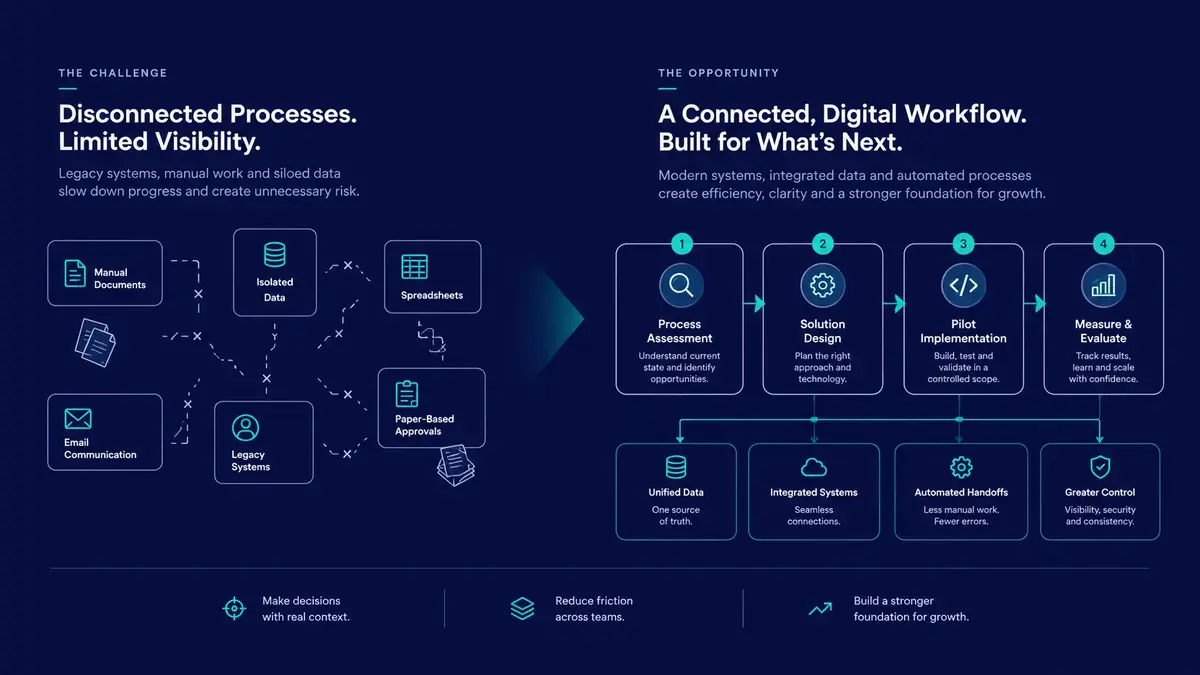
Building the Business Case for Digital Transformation: Problem Definition, Cost-Benefit Analysis, and Phased Rollouts
Digital transformation is often presented as a strategic necessity, but investing in new technology does not automatically improve business performance. Organizations can spend heavily on software, infrastructure, and implementation while leaving the underlying operational problems unresolved.
The difficulty is rarely just choosing the right technology. It is understanding the actual business problem, estimating the full cost of changing existing processes, managing the transition, and defining how success will be measured.
A credible digital transformation business case connects an operational problem to a proposed solution, an economic justification, a manageable implementation plan, and measurable business outcomes.
This guide provides business owners, executive sponsors, operations directors, and engineering leaders with a practical framework for evaluating digital transformation initiatives. It covers process discovery, total cost of ownership, cost-benefit analysis, phased implementation, change management, and post-launch governance.
1. Start With the Problem, Not the Technology
A successful transformation initiative begins with an investigation of existing operations, not a software procurement decision.
Starting with a preferred technology can lead organizations to automate inefficient processes without addressing the reasons those processes are inefficient. Introducing artificial intelligence, cloud infrastructure, or a new enterprise platform may be appropriate, but only when the proposed capability addresses a defined business need.
Consider two approaches:
Technology-first approach
"We need an AI-powered platform. Which parts of our business can we apply it to?"
Problem-first approach
"Our order processing takes too long, errors create costly rework, and staff cannot reliably track order status. What changes would address these problems at an acceptable cost and level of risk?"
The second approach creates a stronger foundation for evaluating possible solutions, including process redesign, better integration, improved interfaces, targeted automation, or a new software platform.
Map the existing workflow
Before commissioning development or requesting vendor proposals, document the workflow from its initial trigger to its final outcome.
Focus on three areas:
Manual touchpoints: Where do employees copy information between spreadsheets, emails, forms, and business systems?
Cycle time and waiting: How much time is spent actively processing work, and how much is lost waiting for approvals, information, or handoffs?
Errors and rework: How often do incorrect entries, missing information, duplicate records, or inconsistent processes require intervention?
Also identify exceptions, dependencies, approval rules, and the people responsible for each stage. These details often reveal why an apparently simple workflow is difficult to change.
Establish a measurable baseline
A business case should describe current performance before proposing improvements.
Consider this hypothetical example of a regional distribution company:
Customer orders arrive as PDF attachments through email.
Staff manually enter order details into an existing ERP system.
The average order requires 25 minutes of processing time.
An estimated 4% of orders contain data-entry errors.
These figures are illustrative assumptions, not industry benchmarks or observed results.
The goal is not simply to deploy a new ordering portal. It is to determine whether a redesigned workflow can reduce processing time, decrease errors, improve order visibility, and deliver enough economic value to justify the investment.
Before setting targets, validate the baseline using representative operational data. Distinguish between active labor time, elapsed processing time, and time spent waiting for other people or systems. Each measure may require a different intervention.
2. Calculate Total Cost of Ownership
A digital transformation proposal is incomplete if it accounts only for software licensing and initial implementation fees.
Total Cost of Ownership (TCO) estimates the direct and indirect costs of acquiring, deploying, operating, maintaining, and eventually replacing a solution over a defined period.
Identify the full cost of implementation
Cost categoryDirect costsOften-overlooked costsImplementationVendor fees, software development, configurationInternal staff time, requirements discovery, data cleansingInfrastructureHosting, databases, storage, networkingBackups, monitoring, staging environments, data transferIntegrationAPI connectors, middleware, migration toolsLegacy synchronization, compatibility maintenance, failure recoverySecurity and complianceSecurity tools, audits, compliance servicesOngoing reviews, incident response, access managementPeople and operationsTraining, documentation, supportTemporary productivity loss, process redesign, change resistanceMaintenance and retirementUpdates, support contracts, replacement systemsTechnical debt, migration planning, legacy decommissioning
The relative importance of each category depends on the organization, the solution, and the systems already in place.
A cloud migration, for example, may reduce some infrastructure-management responsibilities while introducing new recurring charges. A custom application may avoid certain licensing costs but require ongoing development, security updates, and technical ownership.
Separate one-time and recurring costs
A useful business case distinguishes initial implementation costs from recurring operating costs.
One-time costs can include discovery, implementation, initial data migration, integration development, and staff training.
Recurring costs can include subscriptions, hosting, maintenance, support, security reviews, monitoring, and ongoing internal engineering effort.
Also account for transition costs when old and new systems must operate in parallel. Temporary duplication can be necessary to reduce risk, but its cost and intended duration should be explicit.
Estimate the cost of inaction
The Cost of Inaction (COI) describes the economic consequences of leaving the existing problem unresolved.
Depending on the organization, these consequences may include:
Lost revenue caused by slow fulfillment or poor customer visibility.
Employee time consumed by repetitive administrative work.
Financial losses associated with errors, disputes, or rework.
Additional hiring required to support growing transaction volumes.
Exposure associated with unsupported software or unresolved security weaknesses.
Missed opportunities to serve customers or introduce new services.
Not every consequence should be converted into a precise financial estimate. Where the evidence is uncertain, use a documented range and state the assumptions.
The purpose is to compare the proposed investment with a realistic alternative, not to manufacture a large cost-of-inaction figure to make the proposal appear attractive.
3. Build a Transparent Cost-Benefit Model
Once the problem and likely costs are understood, estimate the benefits that the proposed solution could reasonably deliver.
A useful model separates measurable cash savings from capacity improvements, risk reduction, and less certain strategic benefits.
Estimate labor capacity released
Returning to the hypothetical distribution company, assume:
2,000 orders are processed each month.
Each order currently requires 25 minutes of active processing.
A proposed workflow is expected to reduce active processing to 10 minutes.
The estimated time released per month would be:
2,000 orders × 15 minutes saved = 30,000 minutes, or 500 hours per month.
This is a scenario calculation, not a forecast of verified savings. The actual result would depend on whether the new workflow achieves the assumed processing time and how often exceptions require manual intervention.
Crucially, released employee capacity is not automatically a cash saving. The financial value depends on how that capacity is used. It might reduce overtime, avoid planned hiring, increase throughput, or allow employees to focus on higher-value work.
If employees remain on the same payroll and their working hours do not change, the organization may gain operational capacity without immediately reducing expenses.
Calculate the investment payback
A simplified payback calculation is:
Payback period = Initial investment ÷ Monthly net cash benefit
Suppose a proposed implementation costs $30,000 and is expected to produce $5,000 in net cash savings per month after recurring operating expenses.
The estimated payback period would be:
$30,000 ÷ $5,000 = 6 months.
These values are hypothetical and illustrate the calculation only. A credible business case must substantiate the expected cash benefit and account for implementation timing, recurring costs, and any ramp-up period.
For investments with meaningful benefits and costs over several years, consider a discounted cash flow model and Net Present Value (NPV). These methods account for the timing of future cash flows rather than treating every dollar as economically equivalent regardless of when it occurs.
Use scenarios instead of a single optimistic forecast
Prepare at least three scenarios:
Conservative: Benefits arrive more slowly, adoption is lower, or implementation costs are higher than expected.
Expected: Assumptions reflect the most defensible current estimate.
Upside: The solution performs better than expected or enables additional measurable benefits.
For each scenario, document the assumptions behind implementation costs, adoption, operating expenses, benefits, and timing.
This makes the decision more transparent and helps leadership understand what must be true for the investment to succeed.
4. Reduce Implementation Risk With Phased Rollouts
Large transformation programs often involve several systems, teams, and workflows. Replacing everything in a single cutover can concentrate operational risk and make failures difficult to isolate.
A phased rollout allows the organization to test assumptions, learn from actual use, and expand only when the solution demonstrates acceptable performance.
Phase 1: Crawl, validate the pilot
Start with a bounded workflow that is important enough to produce meaningful learning but limited enough to contain the consequences of failure.
During the pilot:
Select a clearly defined operational problem.
Document the baseline and target outcomes.
Recruit a small group of representative users.
Test data migration, integrations, permissions, and exception handling.
Establish rollback and manual-continuity procedures.
Collect feedback and compare results with the baseline.
A proof of concept can demonstrate technical feasibility, but it does not automatically prove production readiness. The pilot should test the operational conditions that matter, including reliability, usability, security, and support requirements.
Phase 2: Walk, expand carefully
After validating the pilot, expand to additional users or related workflows.
At this stage, the organization should improve monitoring, refine the user experience, formalize training, and resolve integration issues uncovered during the initial rollout.
Where legacy systems must remain active, define which system owns each data field and how conflicts are resolved. Bidirectional synchronization should not be introduced casually, as conflicting updates and retry behavior can create duplicate or inconsistent records.
Expansion should be based on evidence that the workflow is stable and that the intended benefits are achievable.
Phase 3: Run, scale and optimize
Once the solution has demonstrated reliable performance across the intended workflows, expand its use and establish long-term ownership.
This phase may include automating repetitive exception handling, improving cross-departmental reporting, retiring redundant systems, and optimizing infrastructure or licensing costs.
Legacy systems should be decommissioned only after the organization has validated data completeness, retention requirements, recovery procedures, and the ability to operate without the old workflow.
Select the right pilot
An effective pilot has three characteristics:
Measurable outcomes: The process has a clear start and finish, with a reliable baseline and defined success criteria.
Contained risk: A pilot failure will not unnecessarily interrupt critical business operations, and a practical fallback exists.
Committed stakeholders: The people who perform the work are willing to participate, provide feedback, and help validate the results.
A pilot should be designed to test the most important assumptions in the business case. If the central uncertainty is whether employees will adopt the new workflow, the pilot must measure adoption rather than merely demonstrate that the software functions.
5. Make Change Management Part of the Architecture
Digital transformation changes how people perform work, make decisions, and exchange information. Even technically sound software can fail to deliver value when it does not fit real operational needs.
Change management should therefore begin during discovery rather than after implementation.
Involve frontline employees
Employees who perform a process every day understand its exceptions, informal workarounds, and practical constraints. Include them in requirements discovery, workflow design, and user testing.
Their involvement helps uncover requirements that may be invisible to executive sponsors or external implementation teams.
Design around real tasks
Interfaces should help people complete their work accurately and efficiently. Clear terminology, sensible defaults, contextual guidance, input validation, and useful error messages can reduce confusion.
Usability should be evaluated through actual task completion, error rates, support requests, and user feedback, not just visual appearance.
Assign clear ownership
Every production system needs an accountable owner after launch.
That ownership should cover operational decisions, access management, support escalation, maintenance, security updates, vendor relationships, and ongoing improvement.
Without defined ownership, software can become another unsupported system that gradually accumulates technical debt and operational risk.
Plan for adoption resistance
Resistance is not always a sign that employees dislike technology. It may reveal that the new process introduces unnecessary work, removes a useful capability, or fails to address an existing problem.
Monitor whether users complete workflows in the new system, where they abandon tasks, and which workarounds remain common. Use this evidence to improve the process rather than treating adoption as a communication problem alone.
6. Define KPIs and Post-Launch Governance
A business case should establish how success will be evaluated before implementation begins.
Choose indicators that directly reflect the problem identified during discovery. Avoid collecting large volumes of metrics that do not inform a decision.
Useful measures include:
DimensionExample KPIWhat it helps evaluateSpeedMedian and 90th-percentile processing timeWhether work is completed faster and more consistentlyQualityError rate and rework rateWhether the new workflow improves accuracyThroughputTransactions completed per employee-hourWhether operational capacity improvesAdoptionEligible users completing key workflowsWhether the solution is being used as intendedReliabilityFailed transactions and service availabilityWhether the workflow is dependableFinancialRealized cash savings and recurring costsWhether the investment produces its expected economic value
Define each metric precisely. For example, processing time should specify its start and end events, while adoption should distinguish between logging in and successfully completing a meaningful task.
Where possible, compare results against the baseline and account for changes in transaction volume, staffing, seasonality, and business conditions.
Establish review milestones
Formal reviews at 30, 90, and 180 days after launch can provide a useful starting framework, adjusted to the project's risk and expected benefit timeline.
At each review, ask:
Are the original operational problems measurably improving?
Are users adopting the intended workflows?
Are actual implementation and operating costs within expectations?
Have new risks or dependencies emerged?
Are the expected financial benefits being realized?
Should the initiative continue, change direction, expand, or stop?
Assign an owner to each KPI and establish who can authorize corrective action. A dashboard without accountability is unlikely to improve business outcomes on its own.
Conclusion
Digital transformation is not simply an IT procurement exercise or a technology upgrade. It is a deliberate change to how an organization operates, supported by software and engineering decisions that should be justified by measurable business needs.
A credible business case begins with a verified operational problem, estimates the full cost of ownership, compares realistic benefits with the cost of inaction, and makes implementation risk manageable through phased delivery. It also accounts for employee adoption, system ownership, and the ongoing measurement of results.
The goal is not to introduce the largest possible technology stack. It is to make a demonstrable improvement while maintaining control over cost, risk, and operational complexity.
At Aformix, we build our own software products and also take on client work: custom web development, WordPress development, SEO, and software and SaaS engineering. We believe technology decisions should be grounded in real requirements, maintainable implementation, and a clear understanding of the business outcomes a solution is intended to support.